What Is Joliet in an ISO File?
Joliet is the ISO extension that makes Windows file names readable inside an ISO image. Use it when folder archives need long names, Unicode, and cleaner review.
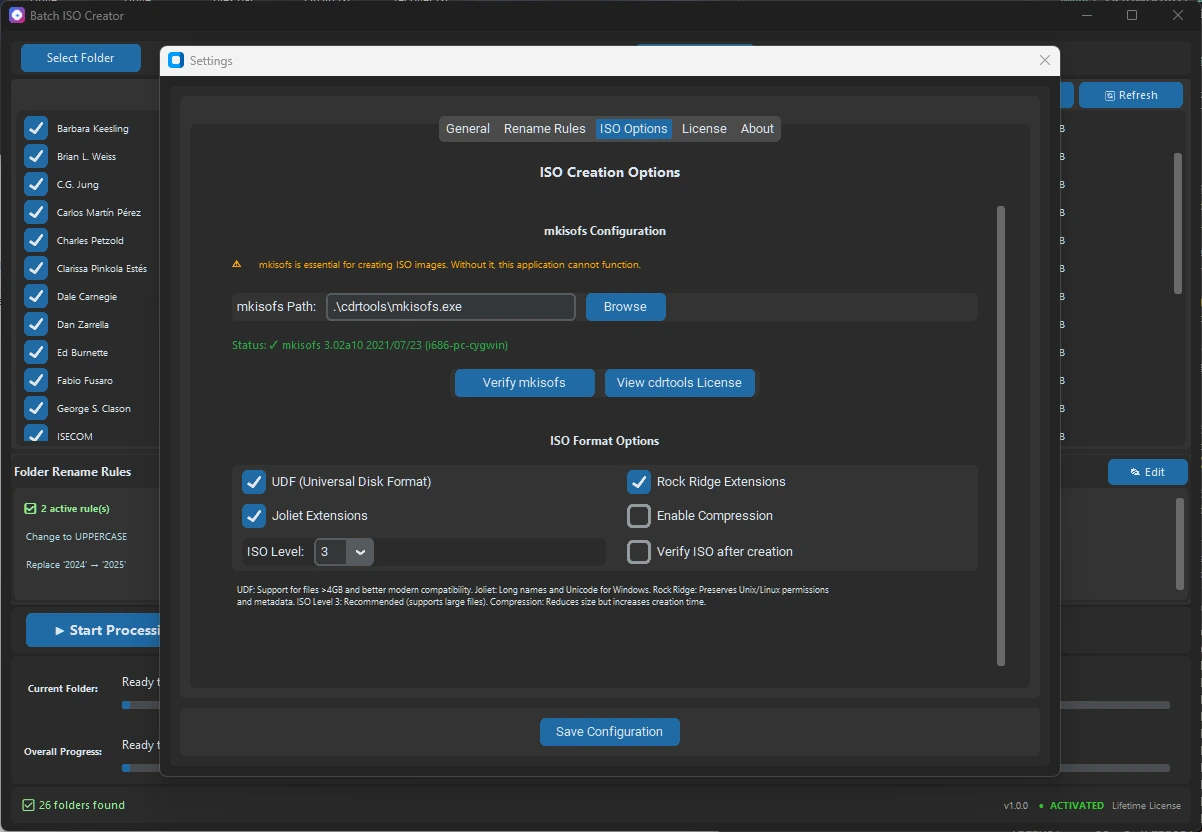
Joliet is an extension to the ISO 9660 file system that adds Windows-friendly long file names and Unicode names inside an ISO image. Without Joliet, an ISO may still open, but the visible file names can be shortened, uppercased, or harder to recognize depending on the original folder structure and reader.
For most Windows folder-to-ISO work, Joliet is useful because the folders were created by people, apps, installers, design tools, training teams, or support teams. Those names are usually more descriptive than old ISO 9660 limits expect. Joliet gives the ISO a Windows-readable naming layer while keeping the older compatibility layer underneath.
Short answer: use Joliet when the ISO will be opened on Windows and the contents need readable long names. Pair it with clean folder names and rename rules when the source tree has duplicates, invalid characters, or very long names.
What Joliet adds to ISO 9660
ISO 9660 is the baseline format that makes an ISO broadly readable. Its original naming rules are strict compared with normal Windows folders. Joliet adds a second naming view designed for Windows, including longer names and Unicode characters. When a Windows system mounts the ISO, it can use the Joliet names instead of showing the older shortened form.
This is why two people can look at the same ISO in different environments and see different names. A Windows user may see the friendly Joliet names. A minimal or older tool may fall back to the ISO 9660 names. That does not mean the data changed; it means the reader is choosing a different naming layer.
| Layer | What it is for | Typical concern |
|---|---|---|
| ISO 9660 | Broad baseline compatibility | Names may be short or less readable |
| Joliet | Windows-friendly long and Unicode names | Still needs sensible source names |
| Joliet Long | Longer Windows-oriented names | Useful only when length is the real problem |
| Rock Ridge | Unix/Linux metadata and naming extensions | Important for mixed-platform archives |
When Windows users need Joliet
Enable Joliet when the ISO is meant for Windows technicians, offline installer kits, driver packs, training folders, software release folders, client archives, or any workflow where people need to read file names after mounting the ISO. If the names carry version numbers, language codes, architecture labels, dates, or product names, Joliet usually makes the mounted ISO easier to inspect.
Joliet is especially useful when a folder archive is not only being stored, but also reviewed. A mounted ISO with readable names is easier to compare against the source folder, easier to document in a handoff, and easier to troubleshoot if one file is missing or named incorrectly.
Where Joliet does not fix the problem
Joliet is not a cleanup system. It will not decide whether Final_Final should become Final, whether two folders should share the same output name, or whether a long product string should be shortened before delivery. If the source folders are inconsistent, the ISO can still be confusing even when Joliet is enabled.
Before creating a large batch, scan for repeated child folder names, invalid Windows or ISO name characters, extremely deep paths, and labels copied from old projects. The guide to Windows ISO file name rules covers the naming pass, and the guide to invalid characters in ISO names is useful when a build fails before the ISO is complete.
When Joliet Long matters
Normal Joliet handles many Windows-friendly names, but it still has practical limits. If the folder set is clean and only a few names are too long, Joliet Long can help preserve more of the original names. If many names are huge or repetitive, shortening them with rename rules is usually better than stretching the limit further.
The difference is intent. Joliet Long is a compatibility choice. Rename rules are a workflow choice. The first helps the ISO reader. The second helps the whole batch stay predictable, readable, and repeatable.
How Batch ISO Creator fits
Batch ISO Creator is a Windows 10/11 tool for turning folders into ISO images without scripts or command-line work. Current product sources describe it as built on mkisofs with ISO 9660, Joliet, and Rock Ridge support. It also supports Batch Mode, Folder Mode, drag and drop, rename rules for folders and ISO files, progress tracking, logs, and operation reports.
That combination matters because Joliet is only one setting in a larger folder-to-ISO workflow. A safer workflow is to choose the ISO settings, clean names before output, create a test ISO, mount it, and then run the full batch. For background on the underlying toolchain, read the guide to mkisofs for folder-to-ISO on Windows.
A practical Joliet checklist
- Know the reader. Use Joliet when Windows users need readable long file names after mounting the ISO.
- Keep ISO 9660 compatibility in mind. Some tools may still show the baseline naming layer.
- Clean the source names first. Fix repeated status words, invalid characters, and confusing folder names before the run.
- Use Joliet Long only when length is the issue. If the names are messy, use rename rules instead of only extending limits.
- Consider Rock Ridge for mixed environments. Joliet is Windows-oriented; Rock Ridge matters when Unix/Linux metadata is important.
- Test one ISO before the batch. Mount the result and confirm the names, structure, and report match the source folder.
Create Windows-Friendly ISO Archives
Use Batch ISO Creator to turn folders into ISO files on Windows, choose ISO settings, apply rename rules, and review output with logs and operation reports before delivery.
FAQ
What is Joliet in an ISO file?
Joliet is an ISO extension that stores Windows-friendly long file names and Unicode names alongside the older ISO 9660 naming layer.
Do I need Joliet for every ISO?
Use Joliet when the ISO will be opened on Windows and the files need readable long names. Very simple compatibility discs may not need it, but Windows folder archives usually benefit from it.
What should I check before creating a Joliet ISO?
Check for extremely long names, duplicate names after cleanup, invalid characters, deep folders, and whether the target systems are Windows-only or mixed-platform.