Joliet Long for Windows ISO File Names
A practical decision guide for long Windows filenames, Joliet Long, UDF, Rock Ridge, and rename rules before a folder-to-ISO batch.
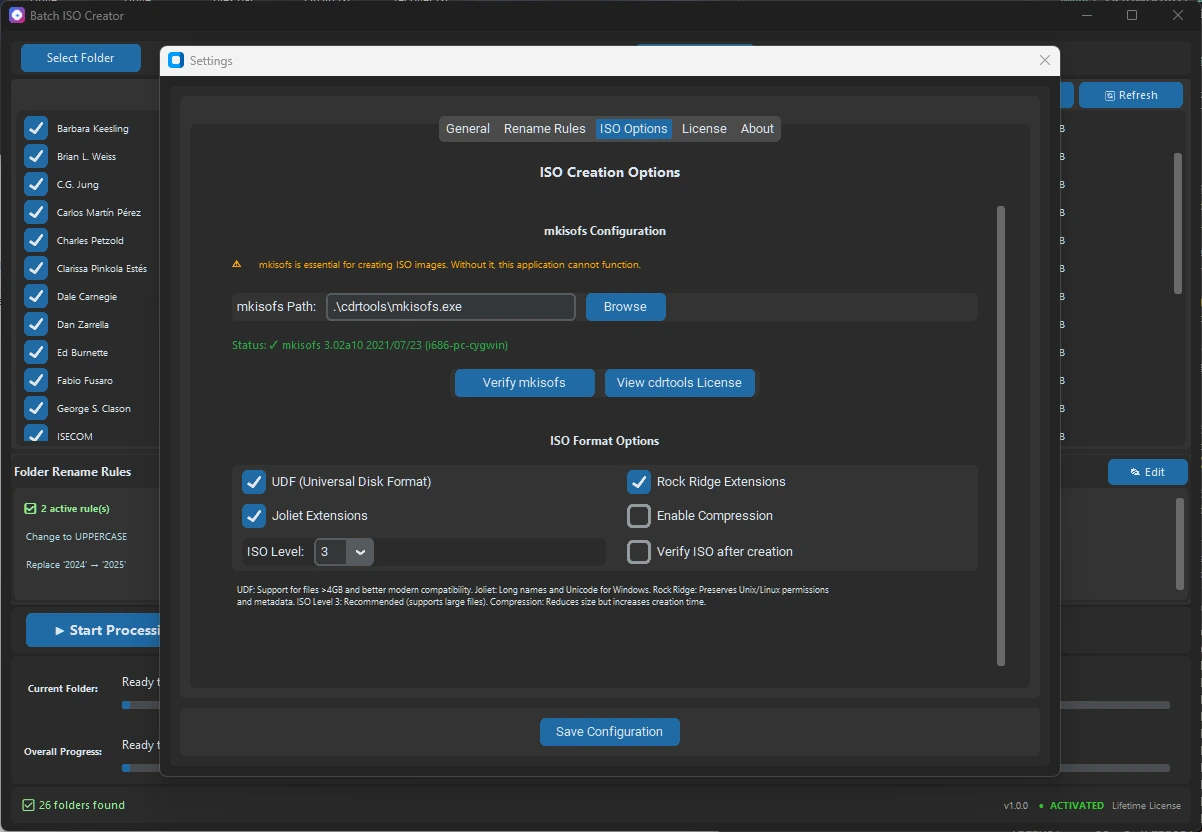
Joliet Long is worth understanding if your ISO job is almost correct, but a few Windows file names keep pushing the build into warnings, fallback behavior, or naming collisions. It is not a magic cleanup tool. It is a compatibility setting for a specific problem: long Windows-oriented names inside an ISO image.
The short answer is simple: enable Joliet Long when the ISO needs Windows-friendly names and the source folders contain names that are too long for normal Joliet. If the names are chaotic, extremely long, or part of a repeatable delivery workflow, use rename rules as well. If the ISO needs modern large-file behavior, evaluate UDF. If Unix/Linux metadata matters, keep Rock Ridge in the decision.
Best fit: Joliet Long is a targeted fix for Windows filename compatibility. It works best after you confirm that the folder structure is reasonable and before you run a large batch.
What Joliet Long solves
ISO 9660 is the old compatibility baseline. Joliet adds Windows-oriented long names and Unicode support. Joliet Long extends that Joliet behavior for cases where normal Joliet is too strict for the real file names in your folders.
That matters because many folder sets are not built for ISO limits. They come from software releases, driver packs, training materials, project archives, downloaded assets, or client folders. Those names often include product names, version numbers, dates, language codes, and status labels. A single filename can carry enough information to exceed the normal Joliet limit.
| Situation | Better choice | Reason |
|---|---|---|
| Short Windows filenames | Standard Joliet | Keeps the ISO simple and broadly readable |
| Names slightly beyond normal Joliet | Joliet Long | Preserves more of the original Windows names |
| Very long or messy names | Rename rules | Makes output predictable instead of stretching limits |
| Large files or modern archive use | UDF | Fits newer ISO workflows and large-file scenarios |
| Unix/Linux metadata matters | Rock Ridge | Preserves details that Windows naming alone does not cover |
When to enable Joliet Long
Enable Joliet Long when the output is mainly for Windows users, virtual machines, support kits, offline installer folders, or archives that should keep recognizable file names. It is especially useful when the folder set is otherwise clean: the problem is length, not random naming.
A good example is a driver folder where names include model numbers and release dates. Another is a software release folder where each file name includes product, architecture, version, and locale. You may want those names to stay readable after mounting the ISO, because they help a technician or reviewer understand the contents without opening every file.
When not to rely on it alone
Do not treat Joliet Long as a substitute for naming discipline. If many names are huge, inconsistent, duplicated, or full of copied status text, extending the limit only delays the cleanup. The ISO might build, but the output may still be hard to read and hard to support later.
In that case, use rename rules before the ISO is finalized. A repeatable rename rule is better than a one-off manual cleanup because it can be reused across the next batch. It also makes the output easier to explain in a report or handoff note.
A practical workflow before a batch
- Start with one representative folder, not the whole batch.
- Check whether the target audience is Windows-only, mixed-platform, or archive-focused.
- Enable Joliet when Windows long names matter, then enable Joliet Long if normal Joliet is too strict.
- Use UDF for modern large-file needs when that fits the target environment.
- Use Rock Ridge when Linux or Unix metadata should survive the ISO process.
- Add rename rules if filenames are messy, overly verbose, duplicated, or inconsistent.
- Create one test ISO, mount it, and review the report before running the full batch.
Rename rules make the result repeatable
Joliet Long answers one technical compatibility question. Rename rules answer a workflow question: what should the output names look like every time you run this job?
Batch ISO Creator supports rule types such as case conversion, pattern matching, prefix, suffix, insert, delete, and serialization. That means you can shorten predictable parts of a name without losing the useful information. For example, you might remove repeated vendor text, normalize separators, add a project prefix, or number folders and ISO names at the beginning, end, or a specific position.
| Before | Rename approach | After |
|---|---|---|
| Vendor.Product.Driver.Package.Windows.11.x64.Release.2026.Final | Replace repeated text and add model prefix | ModelA_Driver_Win11_x64_2026 |
| Training_Module_03_Student_Files_Updated_Final_Final | Delete duplicated status words | Training_Module_03_Student_Files |
| Client Archive Folder | Serialization at a fixed position | 001_Client_Archive_Folder |
How Batch ISO Creator fits
Batch ISO Creator is built for folder-to-ISO work on Windows. It uses mkisofs, supports ISO 9660, Joliet, Joliet Long, UDF, and Rock Ridge options, and keeps processing local on your PC. The value is not only the checkbox. It is the ability to test one folder, apply rename rules, run a batch, watch progress, and keep a report with the output.
That matters when you are creating many ISOs from many folders. A single ISO utility can solve one file. A repeatable batch workflow helps when the same naming and compatibility decisions must apply across dozens of folders.
Create Cleaner Windows-Friendly ISO Files
Use Batch ISO Creator when long filenames, Joliet Long, rename rules, batch output, logs, and reports need to work together in one Windows folder-to-ISO workflow.
FAQ
Should I enable Joliet Long for every ISO?
No. Enable it when Windows filename compatibility matters and normal Joliet names are too short. For routine short names, standard Joliet is simpler.
What should I do when Joliet Long is still not enough?
Clean the source names with rename rules, or choose a different ISO filesystem option such as UDF when that fits the target environment.
Does Batch ISO Creator support Joliet Long?
Yes. Batch ISO Creator includes a Joliet Long option and can also use rename rules, progress logs, and reports to make large folder-to-ISO jobs easier to review.