When to Use Rock Ridge for Windows ISO Archives
A practical guide to Rock Ridge, Joliet, ISO 9660, and rename rules when turning Windows folders into portable ISO archives.
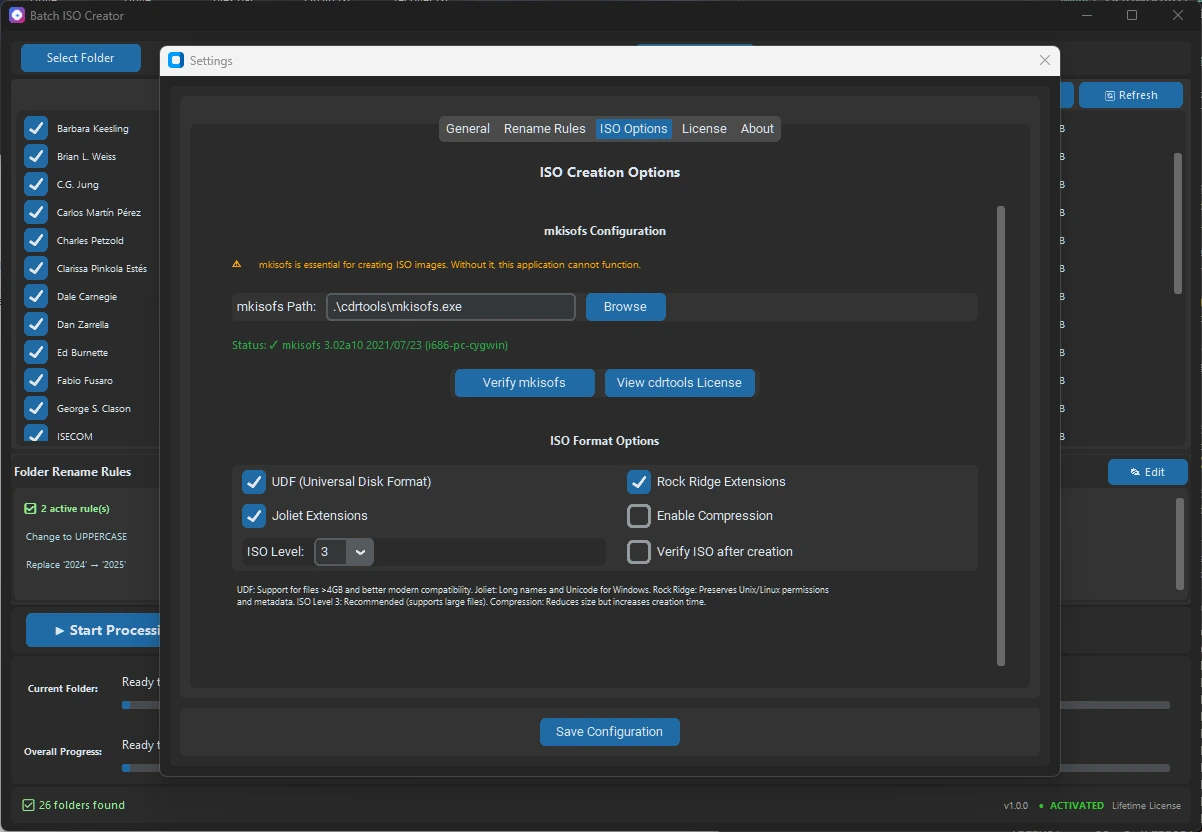
Rock Ridge is easy to misunderstand if you create ISO files on Windows. It is not the setting that makes Windows long file names look nicer. That job usually belongs to Joliet or Joliet Long. Rock Ridge matters when an ISO may be opened by tools that understand Unix-style metadata, or when you want the archive to carry more than the basic ISO 9660 view.
That distinction is useful for anyone packaging folders into ISO files. A folder can be Windows-first, but the ISO may later be checked by a recovery tool, mounted in a VM workflow, inspected by a Linux utility, or stored as a long-term archive. The right setting depends on where the ISO will be read, not only where it was created.
Short answer: enable Rock Ridge when Unix-style metadata or non-Windows inspection matters. For ordinary Windows-friendly names, focus on Joliet or Joliet Long, then use rename rules to keep folder and ISO names clean before output.
What Rock Ridge actually adds
Classic ISO 9660 is a conservative baseline. It exists for broad compatibility, but it is not designed around modern readable names or richer metadata. Joliet extends ISO behavior for Windows long names and Unicode. Rock Ridge extends ISO behavior for Unix-style systems by adding metadata that the basic ISO 9660 directory view does not carry.
That means Rock Ridge is not a cosmetic switch. It is a compatibility layer for a different family of readers. If every person who will open the ISO uses Windows File Explorer, Rock Ridge may not change their visible experience. If the archive may be inspected outside the normal Windows path, it can be worth enabling as part of a compatibility-focused preset.
| Setting | Best fit | Main decision |
|---|---|---|
| ISO 9660 | Broad baseline compatibility | Use as the safe common foundation. |
| Joliet | Windows-readable long names | Use when Windows display names matter. |
| Joliet Long | Longer Windows filename cases | Use when regular Joliet is not enough. |
| Rock Ridge | Unix-style metadata and tools | Use when the ISO may be inspected outside Windows. |
When Windows users should care
Windows users should care about Rock Ridge when the ISO is not only a local Windows handoff. That can happen in technical support, VM labs, training material archives, driver packs, recovery kits, or long-term folder archives that may be inspected by different tools later. You are still creating the ISO on Windows, but the archive has to survive a wider reading path.
Rock Ridge can be a good default for technical archive jobs where extra compatibility costs less than revisiting the ISO later. It is less important for a simple one-off ISO that will be mounted only on Windows and discarded after use.
- Start with the reader. Decide whether the ISO is Windows-only or may be inspected by Unix/Linux-aware tools.
- Choose name support. Use Joliet for Windows-readable names, and consider Joliet Long for folders with longer file names.
- Add Rock Ridge when the archive has mixed readers. It helps keep the ISO more useful outside the basic Windows path.
- Clean names before creation. Compatibility settings do not replace readable folder and ISO file names.
Rock Ridge does not fix messy names
Filesystem settings and naming cleanup solve different problems. Rock Ridge can help a reader understand extra metadata. It does not turn vague source folder names into clear output files. It also does not decide whether every ISO in a batch should use the same project, version, date, or sequence pattern.
That is where rename rules matter. Batch ISO Creator supports rules for folder and ISO names, including case conversion, pattern support, prefix, suffix, insert, delete, and serialization. Serialization can number folder and ISO names at the beginning, end, or a specific position, while keeping numbering synchronized when the processing list changes.
| Problem | Better tool | Why |
|---|---|---|
| Windows names are too long for a normal ISO view | Joliet Long | It targets Windows long-name compatibility. |
| ISO may be inspected by Unix/Linux tools | Rock Ridge | It adds metadata those tools can understand. |
| Output files need a consistent project pattern | Rename rules | They standardize names before output. |
| Many folders must become many ISO files | Batch Mode | It avoids repeating the same setup manually. |
A practical preset for folder archives
For a Windows-first folder archive that might be read by more than one kind of tool, start with a conservative preset: ISO 9660 as the baseline, Joliet for readable Windows names, Joliet Long when the folder set contains longer names, and Rock Ridge when the ISO may be inspected outside Windows.
Then run one representative folder before the full batch. Pick a folder that includes long names, nested directories, mixed punctuation, and the same naming style as the real job. If the test ISO mounts cleanly and the names make sense, scale to the parent folder.
How Batch ISO Creator fits the workflow
Batch ISO Creator is built for Windows 10/11 64-bit and uses mkisofs for ISO creation. It supports ISO 9660, Joliet, Rock Ridge, and Joliet Long, with Batch Mode for parent folders, Folder Mode for selected folders, drag and drop, progress tracking, logs, operation reports, and local processing on the PC.
Use Folder Mode when you want to test one folder and confirm the ISO settings. Use Batch Mode when the parent folder contains many subfolders and each one should become its own ISO. If the source names are inconsistent, add rename rules before the run instead of cleaning the finished output by hand.
Choose ISO Settings Before the Batch Run
Use Batch ISO Creator to create Windows folder archives with ISO 9660, Joliet, Rock Ridge, Joliet Long, rename rules, logs, and reports in one local workflow.
FAQ
Should Windows users enable Rock Ridge?
Enable Rock Ridge when the ISO may be inspected by Unix or Linux tools, or when preserving Unix-style metadata matters. For ordinary Windows filename display, Joliet or Joliet Long usually matters more.
Does Batch ISO Creator support Rock Ridge?
Yes. Batch ISO Creator is built on mkisofs and supports ISO 9660, Joliet, Rock Ridge, and Joliet Long for folder-to-ISO workflows on Windows.
Is Rock Ridge a replacement for rename rules?
No. Rock Ridge is a compatibility setting. Rename rules are still the cleaner way to standardize folder and ISO file names before output is finalized.