Folder2ISO Alternative: When a Simple Utility Turns into a Bigger Workflow
Folder2ISO is popular for a reason: it is small, direct, and focused. But when the job grows from "make one ISO" to "package a folder library cleanly", Batch ISO Creator gives the workflow more room to breathe.
There is something appealing about tools that do one job plainly. Folder2ISO has that spirit. The official Folder2ISO site describes it as a free, portable standalone tool for creating an ISO image from a folder, with GUI and command-line downloads. TrustFm's Folder2Iso page describes a portable Windows and Linux application that uses mkisofs, supports drag and drop, and added multiple jobs and command-line support in later versions.
That makes Folder2ISO a useful tool to know. If you want a tiny utility for a straightforward folder-to-ISO task, it belongs on the shortlist.
Batch ISO Creator is for the moment after that. The moment you are no longer testing an ISO workflow, you are operating one. You care about repeatable settings, output names, folder batches, progress feedback, and the little details that make a run feel controlled instead of improvised.
Positioning in one sentence: Folder2ISO is a good lightweight utility; Batch ISO Creator is the better commercial workflow when you want to convert many Windows folders into well-named ISO files with logs and less manual cleanup.
The "I Need More Than One ISO" Moment
Most people do not go looking for a Folder2ISO alternative because the basic idea is confusing. They go looking because the job around the ISO changed. Maybe a one-off archive became a monthly process. Maybe ten folders became three hundred. Maybe a clean naming convention suddenly mattered because those ISOs were going to be stored, searched, or handed to someone else.
That is the moment Batch ISO Creator is built for. It keeps the same core promise, folder in, ISO out, but wraps it in a workflow that is easier to repeat.
Batch selection
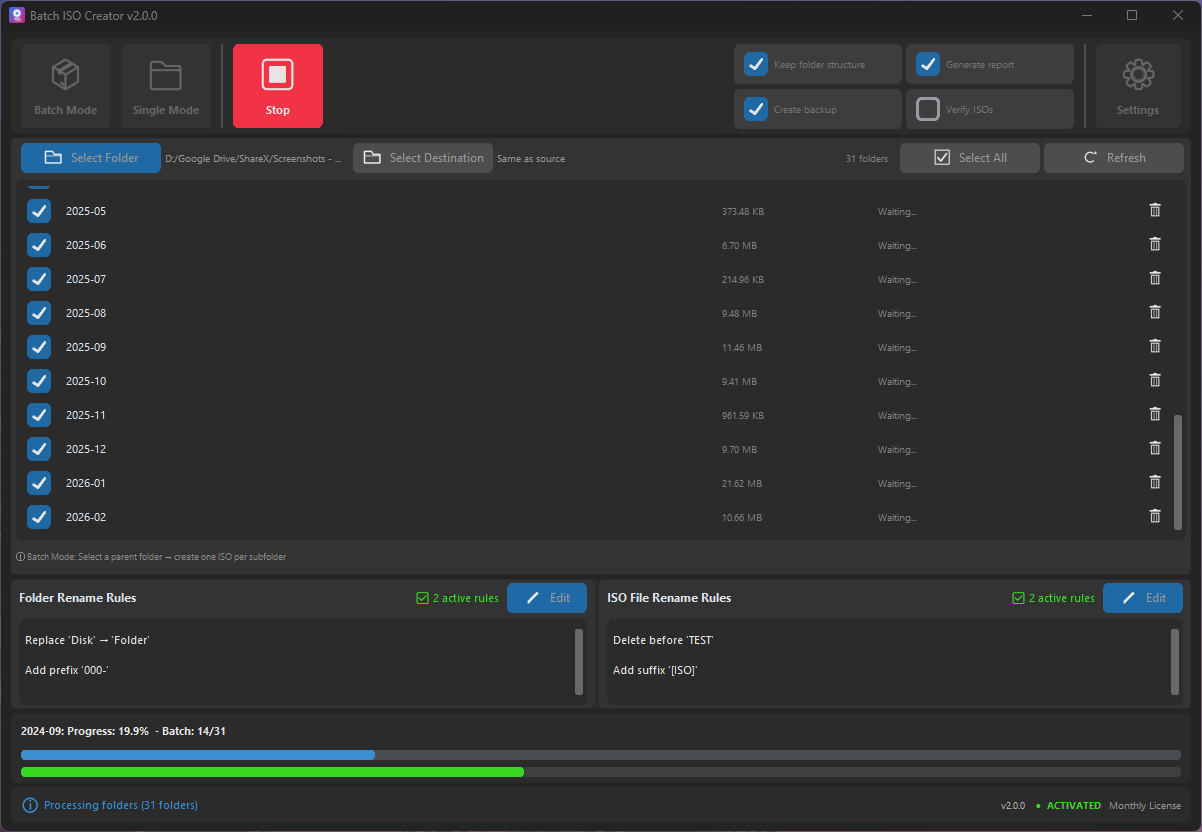
Point Batch ISO Creator at a folder set and process many folders in one run. This is where it feels less like a utility and more like a production tool.
Rename rules
Clean names before the files are generated. Use case changes, replace rules, regex, prefixes, and suffixes to make output predictable.
Logs and reports
When a batch finishes, you can see what happened. That matters if ISO files are deliverables rather than personal experiments.
Folder2ISO vs Batch ISO Creator
The most useful comparison is not "which app has every possible ISO feature?" It is "which app makes bulk folder packaging easier for a Windows user?" On that question, Batch ISO Creator is intentionally stronger.
| Workflow need | Folder2ISO style | Batch ISO Creator style | Why it helps |
|---|---|---|---|
| Make an ISO from a folder | Small, direct utility flow | Modern Windows workflow with single and batch modes | You can start simple and scale up without changing tools. |
| Process many folder jobs | Capable options for jobs and command-line use | Batch-first interface for repeated folder sets | Less setup friction for users who prefer a polished GUI. |
| Keep output names consistent | Works best when names are already organized | Built-in rename rules for common cleanup patterns | Cleaner archives, less manual renaming after the run. |
| Review the run | Focused utility feedback | Progress, logs, and reports | Better confidence when the ISO files matter to someone else. |
| Commercial polish | Lightweight and practical | Designed for paid, supported Windows productivity | A better fit when saving time is the main reason to buy. |
A Better Workflow for Clean Archives
The biggest reason to upgrade from a tiny utility to Batch ISO Creator is not just speed. It is cleanliness. A folder archive can become messy in quiet ways: inconsistent capitalization, spaces that should be underscores, project codes missing from file names, or output ISO names that do not match the internal folder structure.
Batch ISO Creator helps you fix that before the ISO files exist. That is important because once the output has been generated, cleanup becomes a second job. With rename rules in the workflow, the output is closer to final on the first pass.
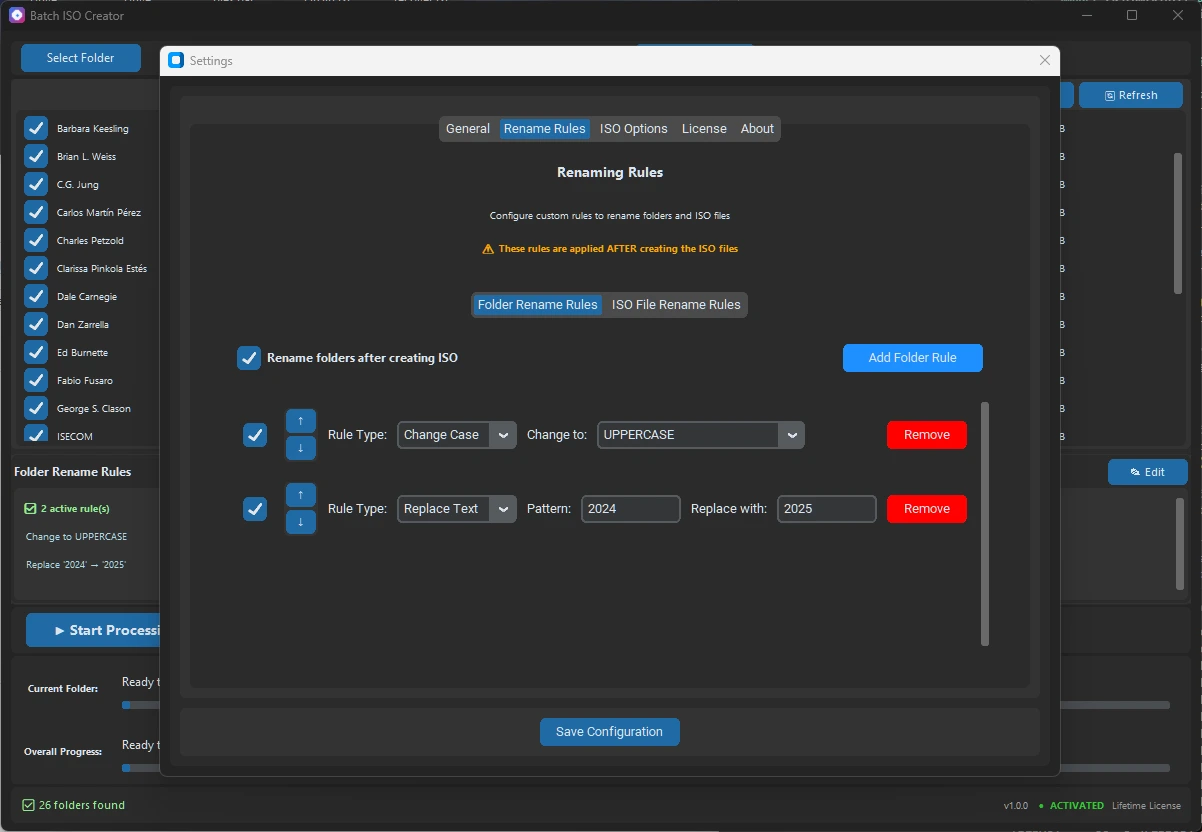
Example: Turning a Folder Library into ISO Files
Say you have this source folder:
D:\Archives
|-- Course Pack Spring 2026
|-- driver_backup_lenovo_lab
|-- Release Candidate Build 19
|-- Vendor Tools - Finance Team
A basic folder-to-ISO run can create ISO files from those folders. A better commercial workflow makes the output easier to keep:
D:\ISO Output
|-- COURSE_PACK_SPRING_2026.iso
|-- DRIVER_BACKUP_LENOVO_LAB.iso
|-- RELEASE_CANDIDATE_BUILD_19.iso
|-- VENDOR_TOOLS_FINANCE_TEAM.iso
That is the kind of practical difference buyers understand immediately. Nobody wants to pay for software because a landing page says "powerful." They pay because the job comes out cleaner and they trust the result.
When Folder2ISO Is Still a Fine Choice
It is worth being fair: Folder2ISO is still attractive if you want a tiny, portable utility and the task is narrow. For a quick personal ISO, it can be the right tool. For users who enjoy command-line workflows, the newer Folder2ISO pages also document CLI usage, and TrustFm's older version documents command-line and multiple-job behavior.
Batch ISO Creator does not need to pretend those strengths do not exist. The better argument is simple: if you are doing enough ISO work that naming, reporting, and repeatability matter, choose the tool that was built around that bigger workflow.
Sales angle: You are not buying Batch ISO Creator because Folder2ISO is bad. You are buying it because your time is worth more than another round of setup, manual naming, and output checking.
Recommended Setup for Ex-Folder2ISO Users
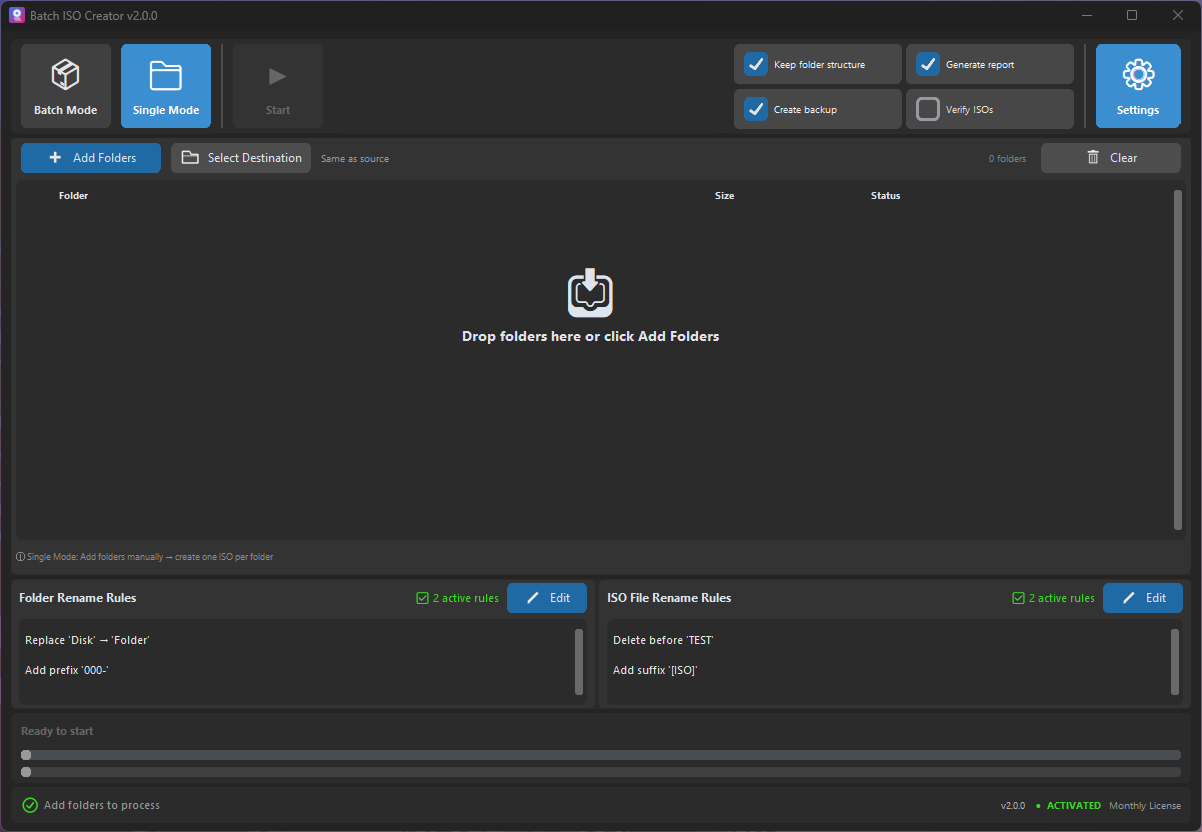
- Start with Folder Mode. If you are used to one-folder jobs, begin there. Confirm the output and settings feel right.
- Move to Batch Mode. Point the app at a parent folder that contains all folders you want to convert.
- Create a naming rule you can reuse. Pick one convention, uppercase, lowercase, project prefix, or sanitized names, and keep it consistent.
- Run a small batch first. Process a few folders, review the log, then run the full set.
- Save the process mentally as a template. The next time a similar folder set appears, you already know exactly what to do.
Cost: Why a Paid Alternative Can Make Sense
The Special Anniversary Promo pricing is intentionally accessible: $2.99 monthly, $19.99 annually, or $59.99 lifetime. For a person with one urgent project, the monthly plan is an easy yes. For anyone who handles folder packaging every month, the annual or lifetime plan is the cleaner purchase.
The return is not abstract. If Batch ISO Creator saves even one hour of repetitive clicking, renaming, checking, and rerunning, the software has already justified itself for most professional users.
Ready for a More Polished Folder2ISO Workflow?
Use Batch ISO Creator when your folder-to-ISO jobs need batch processing, clean names, logs, and a Windows interface that feels built for repeated work.
FAQ
Is Batch ISO Creator the same type of tool as Folder2ISO?
They overlap on the basic task: creating ISO files from folders. Batch ISO Creator is more focused on a polished Windows workflow for batch output, rename rules, progress, logs, and reports.
Can I use Batch ISO Creator for just one folder?
Yes. It includes Folder Mode for individual folder jobs and Batch Mode when you are ready to process larger folder sets.
Why pay if Folder2ISO is free?
Pay when the workflow around the ISO matters: repeated jobs, clean output names, logs, and less manual cleanup. Free tools are great until the hidden cost becomes your time.
Research Notes
This article references the current Folder2ISO page, the TrustFm Folder2Iso official page, and the TrustFm documentation.