How to Batch Rename Files While Creating ISOs (Regex & Replace Guide)
Dealing with hundreds of folders with messy names? "Course - 2024 - [1080p]", "Backup_Final_v2", "(Disc 1)"... Learn how to batch rename files while creating ISOs.

Dealing with hundreds of folders with messy names? "Course - 2024 - [1080p]", "Backup_Final_v2", "(Disc 1)"...
If you are creating ISOs for archiving or sharing, you want clean, standardized filenames. But renaming the source folders manually is risky (it breaks paths) and tedious.
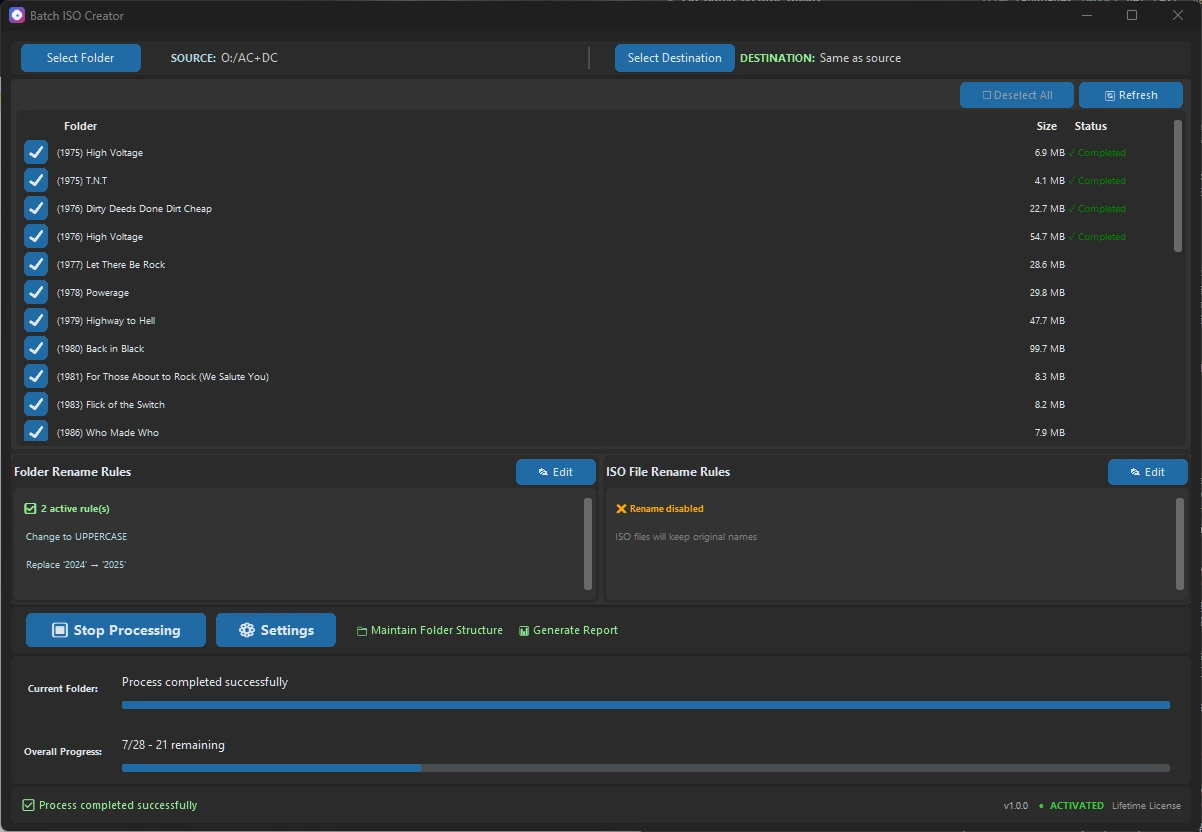
Batch ISO Creator has a built-in **Renaming Engine** that modifies the output ISO filename on the fly, leaving your source folders untouched.
Here is a deep dive into every renaming rule available and how to use them.
The Two Types of Renaming
- Folder Renaming: Cleans up the name derived from the source folder.
- Example: Source
My Documents_Backup-> Result ISOMy Documents.iso
- Example: Source
- ISO Renaming: Applies rules to the specific ISO filename (useful for adding version tags or extensions).
Both use the same powerful rule set.
1. Replace (Simple Text Replacement)
The most basic rule. Replaces exact text matches.
- Use Case: Removing common "junk" words or replacing spaces.
- Example:
- Folder Name:
Project_Files_2024 - Rule: Replace
_with - Result:
Project Files 2024
- Folder Name:
2. Remove (Delete Text)
Deletes specific text strings.
- Use Case: Stripping tags like resolution or year.
- Example:
- Folder Name:
Vacation Photos [HQ] - Rule: Remove
[HQ] - Result:
Vacation Photos
- Folder Name:
3. Regex (Regular Expressions) 🚀
For power users. Use patterns to match complex strings.
- Use Case: Removing anything inside brackets
(),[]or preserving only the year. - Example 1 (Remove brackets):
- Folder Name:
Software (v1.0) [Retail] - Rule: Regex
\s*[\[\(].*?[\]\)]-> Replace with `` (empty) - Result:
Software
- Folder Name:
- Example 2 (Keep Year):
- Folder Name:
2024 - Conference Backup - Rule: Regex
^(\d{4}) - .*-> Replace with$1 Conference - Result:
2024 Conference
- Folder Name:
4. Case Conversion
Standardize capitalization.
- Options:
- Uppercase:
my folder->MY FOLDER - Lowercase:
My Folder->my folder - Title Case:
my folder name->My Folder Name
- Uppercase:
5. Prefix & Suffix
Add text to the beginning or end of the filename.
- Prefix Example:
- Rule: Add Prefix
[Backup] - Result:
[Backup] Project Files
- Rule: Add Prefix
- Suffix Example:
- Rule: Add Suffix
_v1.0 - Result:
Project Files_v1.0
- Rule: Add Suffix
6. Insert (Position-Based)
Inject text at a specific character index or relative to other text.
- Insert at Position:
- Folder Name:
Report2024 - Rule: Insert
_at position7 - Result:
Report_2024
- Folder Name:
- Insert Before/After:
- Folder Name:
GameISO - Rule: Insert
_EUafterGame - Result:
Game_EUISO
- Folder Name:
7. Delete (Position-Based)
Remove characters by count or position.
- Delete from Position:
- Folder Name:
01_Music_Album - Rule: Delete from position
1length3(Removes "01_") - Result:
Music_Album
- Folder Name:
- Delete Before/After:
- Folder Name:
Report - Final - Rule: Delete everything after
- - Result:
Report
- Folder Name:
Why use this instead of a Bulk Renamer?
You might be thinking: "Can't I just use a tool like Bulk Rename Utility first?"
Technically, yes, but it introduces a major problem: You are renaming your actual source folders.
- Destructive vs Non-Destructive: External renameners change your file system. If you make a mistake, your original folder names are gone. Batch ISO Creator is non-destructive; it only changes the output ISO filename.
- The "Missing Link" in the Market:
- ImgBurn creates ISOs but has zero batch renaming.
- Bulk Rename Utility renames files but doesn't create ISOs.
- WinRAR/7Zip archive files but don't create compliant ISO standards (ISO 9660/UDF).
Batch ISO Creator is currently the only tool designed to bridge this gap, allowing you to keep your chaotic source folders "as is" while producing perfectly standardized ISO archives.
- Workflow Speed: Drag 100 folders, apply rules, get 100 clean ISOs. No intermediate steps.
Ready to clean up your archives? Download Batch ISO Creator
Ready to streamline your workflow?
Experience the power of batch ISO creation with Batch ISO Creator.
Download Now